
X analytics for small accounts
When you are starting out, the questions are simple: did anything reach beyond my followers, when do my posts travel, and what should I do more of tomorrow. Bangerkit answers them from a saved copy of your posts, and reading your numbers is included and never uses your replies or follows.
The 3-day trial runs on the plan you choose and includes 50 replies or follows on Starter and 300 on the other plans. A card is required at checkout; after 3 days you pay that plan's monthly price unless you cancel before it ends.
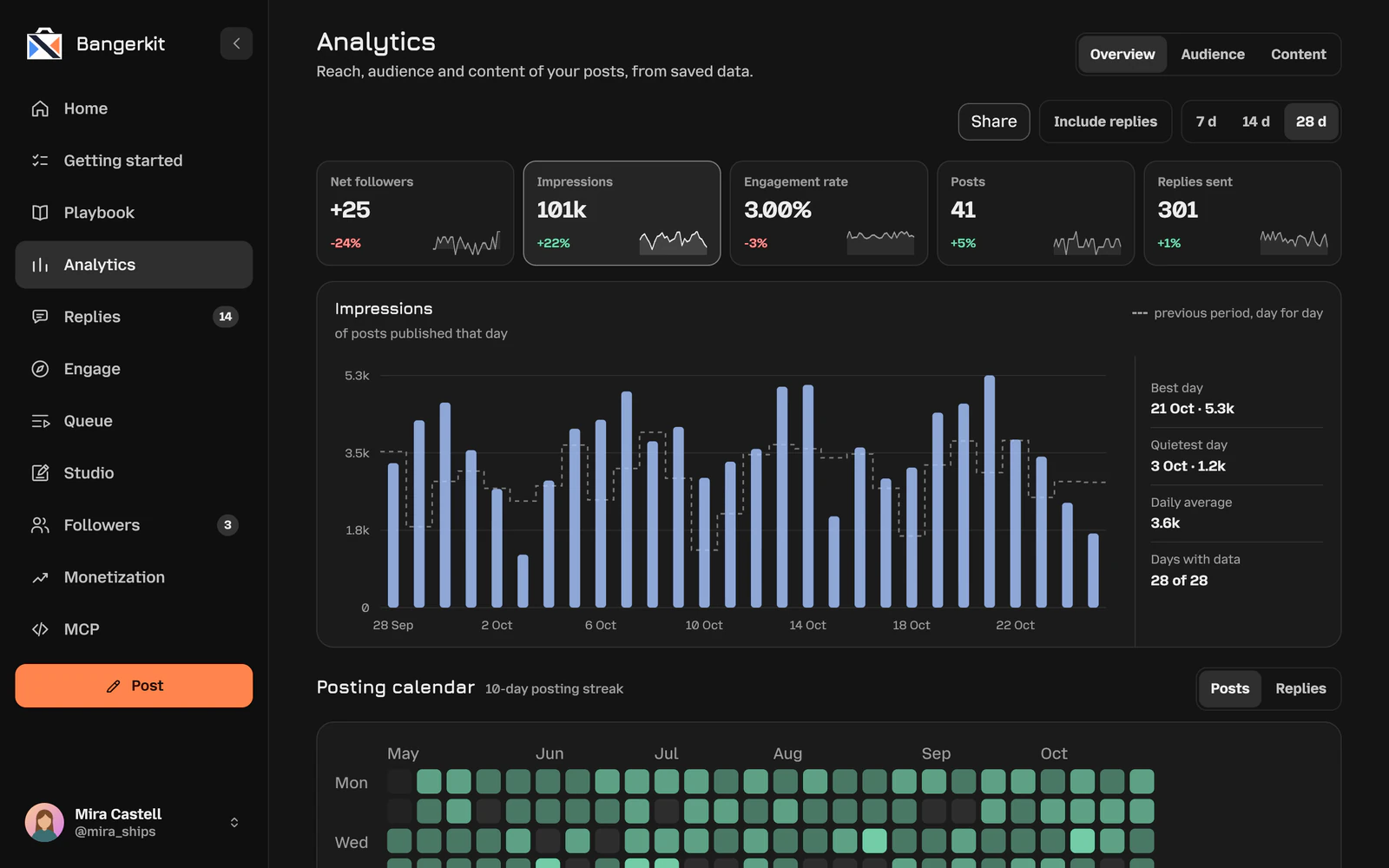
Your numbers, day by day
Overview puts five numbers side by side: net followers (gained minus lost), impressions, engagement rate, posts and the replies you sent. Pick 7, 14 or 28 days and each one is compared with the period before, day for day, with your best day, your quietest day and the daily average.
Switch on Include replies to count the impressions of your replies too, the way X's own analytics does. On your first visit the app reads your posts from the last 28 days, once and at no cost, so the charts start full.
Which posts broke out, and when
For a small account the real question is whether a post travelled beyond your followers. Every post is judged over its first 48 hours against your follower count: pass it and it counts as a breakout. Posts younger than 48 hours are shown racing toward that mark, and a chart plots every post's early views against your followers.
A heat map shows the median views per post for each weekday and three-hour window. A window is only compared once it has five finished posts on three different days; until then it is marked as a hint, not a finding.
Who talks to you
Audience shows your followers and following, how many people replied to you compared with the period before, how many of them came back, and how many of their comments you answered. Below is everyone who comments under your posts: how often, in how many threads, how many you answered, when you last saw them and whether they follow you.
Another account's numbers
To see what works for someone else, open their profile or one of their posts on x.com and press Analyze in the Bangerkit Chrome extension. It reads the account's public profile and its own posts from the last 30 days, up to 200, and shows totals, median post numbers, posts per day, the best weekdays and hours in your time zone, the format mix and the top six posts.
Starter includes 3 analyses in any 24 hours, Creator 10, Pro 30 and Power 100, and an account anyone analyzed in the last 24 hours opens without using one. Nothing is published from it. Without an account, the free account check reads the last 14 days of any public account.
Home: today against your goal
Home turns the numbers into a day. Replies and posts are measured against your usual day over the last two weeks, or against the goal you set until there is a week of history. New followers, views and regulars answered can have daily goals too, and a streak counts the days you kept it up.
Ask “What should I do next?” and AI reads today's numbers and what is waiting, and picks your next moves.
How to read your Twitter account analytics
To see your Twitter stats in Bangerkit, open Overview, choose a period and decide whether to include replies. Keep that setting the same whenever you compare periods. For the free options, read free X analytics: what you get.
Start with posts and impressions, then engagement rate. Check net followers on their own. Then open Audience to see the conversations behind the totals: who came back and whose comments you answered.
When choosing a Twitter analytics tool, start with the question you want answered. Here, Overview compares periods, Breakouts shows early post performance and Audience shows conversations. Give each part of your X analytics dashboard one job instead of treating every number as a target.
A small-account example: what would you do next?
Suppose impressions rose, you published more posts, engagement rate fell and net followers stayed flat. (This is a hypothetical example, not a customer result.) Look at the posts before you change your schedule.
- Posts: compare the finished posts in Breakouts by their early views against your follower count. A higher period total does not mean each post did better.
- Engagement: read the rise in impressions and the fall in engagement rate separately. Check Audience for comments you could answer and people who returned.
- Followers: net followers subtracts losses from gains, so flat growth can still include new followers. Look at both sides.
- Timing: if a promising heat-map window is still marked as a hint, use it to pick another time to test, not as your best posting hour.
Here, we would post again on the topic of a stronger finished post, answer the waiting comments, and compare the next period with the same reply setting. Treat it as a test, not a forecast of follower growth.
A Twitter profiler for another account
If you want an X profiler for someone else's account, use Patterns. Paste an account to see what it posts, when it posts and what earns engagement.
Pick an account whose topics overlap with yours and read its recent posts alongside its posting pattern. Choose one topic or opening to try in your own words, then judge the result in your own account analytics.
Follower analytics: totals or conversations?
For Twitter follower analytics in Bangerkit, Overview tracks net growth and Audience shows who talks to you, including whether the people commenting under your posts follow you. Read them separately: a follower total is not a count of returning commenters.
If your question is who follows you rather than which posts performed, go to the X follower tracker.
Questions
Does looking at analytics use my monthly replies or follows?
No. Analytics and inbox refreshes are included on every plan. Only publishing a reply or post, or following or unfollowing someone on X, counts.
How far back does it go?
On your first visit it reads your posts from the last 28 days, so every chart starts full, and new posts are added as the app sees them. Follower gains and losses start the day the follower watch starts, because X keeps no history of who followed when.
Which plan includes analytics?
Every plan. Starter already includes all analytics and Engage; Creator adds Studio, and Pro and Power add automatic follow-back and auto-unfollow.
Try it on your own account.
Sign in with X and start the trial. The first import of your posts and followers usually takes under a minute.