
See who unfollowed you on X
X shows your follower count going down, never who left. Bangerkit watches your followers and writes down every account that unfollows you, with the time it noticed. It also shows who you follow that doesn't follow you back, and on Pro or Power it can unfollow the ones who leave, once you switch that on.
The 3-day trial runs on the plan you choose and includes 50 replies or follows on Starter and 300 on the other plans. A card is required at checkout; after 3 days you pay that plan's monthly price unless you cancel before it ends.
How it notices an unfollow
Once the follower watch is on, it checks your follower count every ten minutes on Pro and Power. When the count drops, it compares your whole follower list with the saved one and records every account that is gone. The same full comparison runs every six hours (every 12 hours from 10,000 followers, once a day from 50,000), so an unfollow hidden by a new follow in the same ten minutes is still caught. On accounts with 10,000 followers or more, a drop starts a new comparison no sooner than half that time after the last one. Creator runs at half that pace: the count every 20 minutes and the full comparison every 12 hours (every 24 hours from 10,000 followers, every 2 days from 50,000). On Starter, which covers accounts with up to 1,000 followers, the count is checked every hour, a drop starts a comparison no sooner than 12 hours after the last one, and the full comparison runs every 2 days.
The watch starts after your first import, and you can switch it off in the Followers settings. X keeps no history of who followed or left and when, so changes are recorded from the day the watch starts.
A dated list of who left
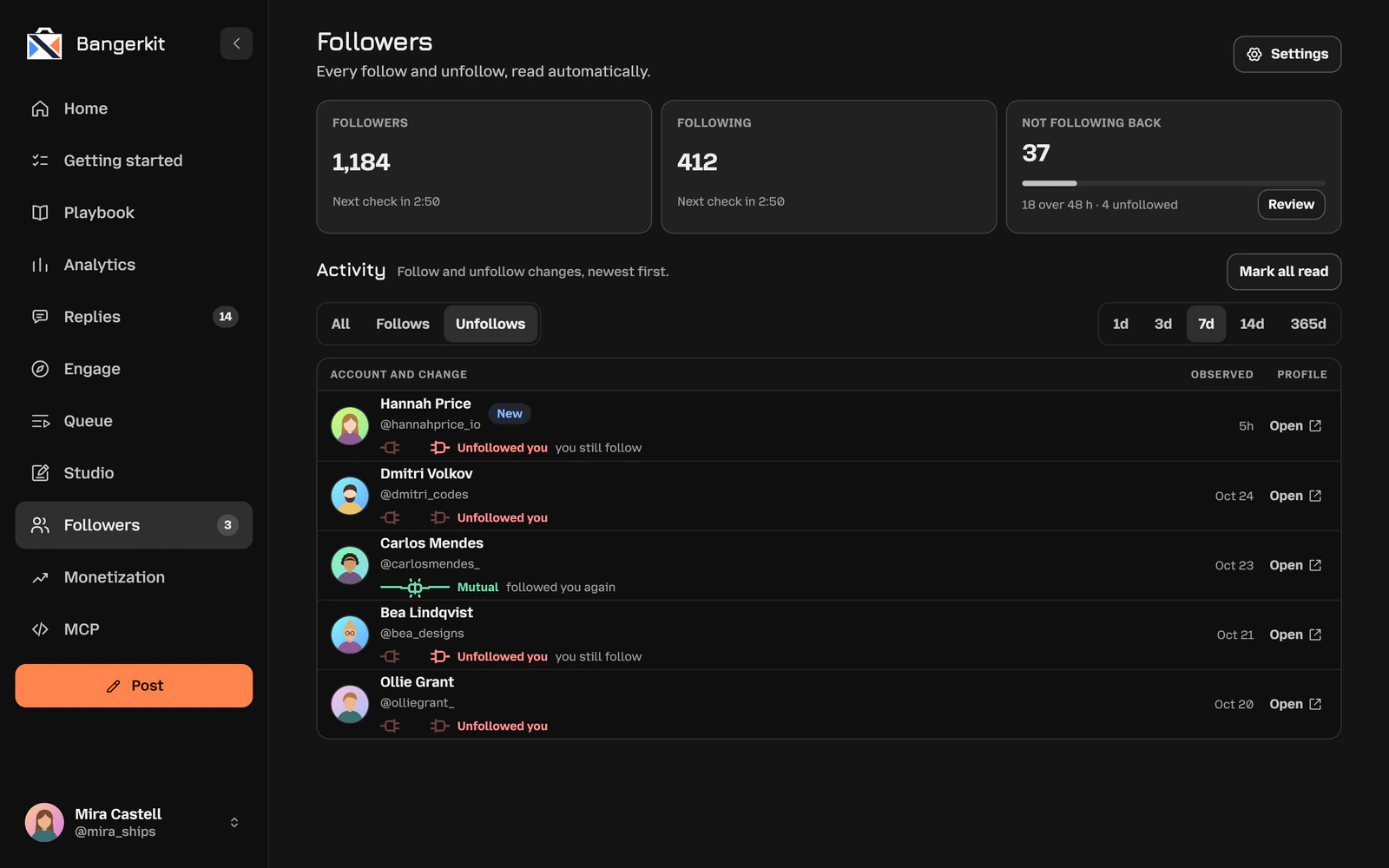
The Followers page lists every follow and unfollow, newest first. Filter it to unfollows and pick a window from the last day to the last year. Each row shows the account, what changed and when it was observed, with a link to open the profile on X.
- Unfollowed you, and whether you still follow them.
- Left after following, for someone who followed you and left again.
- New on the changes you haven't seen yet, until you mark them read.
If the watch was paused or missed a stretch, the list says so, instead of showing a quiet period that nobody was watching.
Who doesn't follow you back
The page also counts the accounts you follow that are not in your follower list. Review opens the ones you have followed for 48 hours or more, together with the share of people who did follow you back.
Unfollow them one at a time. Before each unfollow the app asks X whether they follow you now, and leaves them alone if they do. Each unfollow counts as one of your monthly replies or follows. Your following list is re-read once a day.
Auto-unfollow, only if you switch it on
On Pro and Power the app can unfollow accounts that stop following you. It stays off until you turn it on and confirm that it may act on your X account.
- It waits 2–5 minutes after an unfollow is noticed, so a quick unfollow and follow again is left alone.
- It only unfollows people your saved following list, or the app's own follow-backs, show you follow.
- At most 25 per check, within your plan's limit for automated follows and unfollows: 50 in 24 hours on Pro, 150 on Power. Anything above that waits for your confirmation.
- Each unfollow counts as one of your monthly replies or follows.
Questions
Can I see who unfollowed me before I signed up?
No. X keeps no history of who followed or unfollowed you and when, so there is nothing to rebuild it from. Bangerkit records every change from the day its follower watch starts.
How quickly does an unfollow show up?
On Pro and Power usually within half an hour. Your follower count is checked every ten minutes and a drop starts a full comparison; an account is counted as gone once two comparisons in a row miss it. If a new follow hides the drop, the full comparison every six hours catches it. From 10,000 followers the full comparison runs every 12 hours (once a day from 50,000) and a drop starts one no sooner than half that time after the last, so an unfollow can take up to 12 hours to show up (24 hours from 50,000 followers). Creator runs at half that pace: the count is checked every 20 minutes, so an unfollow usually shows within an hour, and every other interval is twice as long (up to 24 hours from 10,000 followers, 48 hours from 50,000). On Starter the count is checked every hour, a drop starts a comparison no sooner than 12 hours after the last and the full comparison runs every 2 days, so an unfollow can take up to a day to show up.
Will it unfollow people without asking me?
Only if you switch on auto-unfollow on Pro or Power and confirm it. Otherwise nobody is unfollowed until you press Unfollow yourself.
Which plan do I need?
Every plan includes the follower watch, the unfollow history and manual unfollow; on Starter the watch runs while your account has 1,000 followers or fewer. Auto-unfollow comes with Pro and Power, including a 3-day trial of either.
Try it on your own account.
Sign in with X and start the trial. The first import of your posts and followers usually takes under a minute.